
Product design leader, builder and educator.
Product design leader, builder and educator.
AI-Assisted Building
I use AI-assisted development to turn product ideas into working software. These projects show how I combine product thinking, interaction design, and code to quickly explore, test, and ship useful tools.

MD Board App
mdboard is an app that lets you visualize your markdown to-do list on a beautiful, interactive canvas. I prefer keeping my to-do list in a markdown file for its simplicity, but I also want the ability to zoom out and see everything at a high level. The visual canvas offers a refreshing alternative perspective while preserving the benefits of markdown.
mdboard is completely self-contained in a single file and works locally with your files for privacy and convenience. I rapidly prototyped the core functionality, then moved on to designing the interface in Figma and brought it into Claude Code.
mdboard is an app that lets you visualize your markdown to-do list on a beautiful, interactive canvas. I prefer keeping my to-do list in a markdown file for its simplicity, but I also want the ability to zoom out and see everything at a high level. The visual canvas offers a refreshing alternative perspective while preserving the benefits of markdown.
mdboard is completely self-contained in a single file and works locally with your files for privacy and convenience. I rapidly prototyped the core functionality, then moved on to designing the interface in Figma and brought it into Claude Code.
Zendesk - Customize Messaging Web Widget
While at Zendesk, I built an app for the Voice of the Customer team. They routinely needed to customize the Zendesk Messaging Widget for potential customers and demos to reflect the customer’s own branding. This process was previously arduous and time-consuming. In just two days, I used Vercel to build a custom app that let the team quickly customize the widget and generate a branded image. Using the app, the team could customize colors, logo, business name, and tagline. And even the text in the chat widget. It was an instant hit and one of the most rewarding vibe-coded projects I ever worked on.
While at Zendesk, I built an app for the Voice of the Customer team. They routinely needed to customize the Zendesk Messaging Widget for potential customers and demos to reflect the customer’s own branding. This process was previously arduous and time-consuming. In just two days, I used Vercel to build a custom app that let the team quickly customize the widget and generate a branded image. Using the app, the team could customize colors, logo, business name, and tagline. And even the text in the chat widget. It was an instant hit and one of the most rewarding vibe-coded projects I ever worked on.


Time Tracking App (MAC)
I needed a straightforward time tracker without the complexity or recurring costs of feature-heavy subscription services. So, I built a minimalist time tracking app that provides a simple timer for client work and logs hours directly to a Google Spreadsheet. After quickly building a proof of concept, I spent a few days refining the user interactions, adding finishing touches, and integrating Google Sheets to capture logged time. The app runs as a native Mac Electron application.
I needed a straightforward time tracker without the complexity or recurring costs of feature-heavy subscription services. So, I built a minimalist time tracking app that provides a simple timer for client work and logs hours directly to a Google Spreadsheet. After quickly building a proof of concept, I spent a few days refining the user interactions, adding finishing touches, and integrating Google Sheets to capture logged time. The app runs as a native Mac Electron application.
UI Goodies - Daily Design Gold
I run UI Goodies, a curated collection of design resources. To complement the curated collections, I wanted a more dynamic feature to showcase design inspiration, side projects, and creative finds from across the web in a fun, inspiring way. This led to a grid-based, Tumblr-style gallery that brings fresh content to the site and encourages exploration. I built a custom Chrome plugin that collects items using a Cloudflare Worker and Airtable database. These are then displayed by a custom Framer component. This workflow is a great way to highlight and celebrate creative work in the design community.
I run UI Goodies, a curated collection of design resources. To complement the curated collections, I wanted a more dynamic feature to showcase design inspiration, side projects, and creative finds from across the web in a fun, inspiring way. This led to a grid-based, Tumblr-style gallery that brings fresh content to the site and encourages exploration. I built a custom Chrome plugin that collects items using a Cloudflare Worker and Airtable database. These are then displayed by a custom Framer component. This workflow is a great way to highlight and celebrate creative work in the design community.

Cooks in the Comments
The New York Times Cooking community is full of home chefs sharing smart recipe modifications. I frequently make recipes from cooking.nytimes.com and often scan the comments for suggestions, but finding the best ones takes a long time. So I built “Cooks in the Comments,” a personal Chrome extension that reviews the Most Helpful comments, surfaces trusted, crowd-tested advice, and lets you remix recipes with top tweaks in one click.
Everything runs on Chrome’s on-device AI, private, free, and never sending comments off your machine. I designed and built the extension as a side panel for any signed-in user at cooking.nytimes.com. It’s just for personal use, since releasing it would violate The New York Times Terms of Service.
The New York Times Cooking community is full of home chefs sharing smart recipe modifications. I frequently make recipes from cooking.nytimes.com and often scan the comments for suggestions, but finding the best ones takes a long time. So I built “Cooks in the Comments,” a personal Chrome extension that reviews the Most Helpful comments, surfaces trusted, crowd-tested advice, and lets you remix recipes with top tweaks in one click.
Everything runs on Chrome’s on-device AI, private, free, and never sending comments off your machine. I designed and built the extension as a side panel for any signed-in user at cooking.nytimes.com. It’s just for personal use, since releasing it would violate The New York Times Terms of Service.
Match Native Google Docs Styles
I often write documentation and briefs in Google Docs, but I also draft content in tools like Grammarly. When pasting text into a Google Doc, it doesn’t inherit the document’s default styles, requiring tedious manual formatting. To solve this, I built a custom app extension that automatically matches pasted text to the doc’s default styles. I installed it using the App Script feature, and it’s saved me a huge amount of time and frustration. The extension is available on GitHub.
I often write documentation and briefs in Google Docs, but I also draft content in tools like Grammarly. When pasting text into a Google Doc, it doesn’t inherit the document’s default styles, requiring tedious manual formatting. To solve this, I built a custom app extension that automatically matches pasted text to the doc’s default styles. I installed it using the App Script feature, and it’s saved me a huge amount of time and frustration. The extension is available on GitHub.

Save Instagram Recipes to Notion
I often email myself recipes from Instagram, but sorting and organizing them became tedious. To streamline this, I automated the process: I email myself a recipe as usual, using the subject line “Category: Recipe Name” (e.g., “Dinner: Vodka Sauce Pasta”) and including the Instagram link in the body of the email. A Gmail filter labels any email containing “instagram.com” as “Recipes For Notion.” Every 15 minutes, a Google Apps Script scans this label, parses the subject and link, and creates a new Notion card automatically.
I often email myself recipes from Instagram, but sorting and organizing them became tedious. To streamline this, I automated the process: I email myself a recipe as usual, using the subject line “Category: Recipe Name” (e.g., “Dinner: Vodka Sauce Pasta”) and including the Instagram link in the body of the email. A Gmail filter labels any email containing “instagram.com” as “Recipes For Notion.” Every 15 minutes, a Google Apps Script scans this label, parses the subject and link, and creates a new Notion card automatically.
Share Quote Feature
I run Everyday UX, a publication to help designers grow. Inspired by one of Substack’s features, I wanted a way to create shareable images from article text on my Ghost blog. So, I developed a premium code snippet that makes this easy: simply highlight text, and a “Share Quote” button appears. Clicking it opens a modal with straightforward customization options for your shareable quote image.
I run Everyday UX, a publication to help designers grow. Inspired by one of Substack’s features, I wanted a way to create shareable images from article text on my Ghost blog. So, I developed a premium code snippet that makes this easy: simply highlight text, and a “Share Quote” button appears. Clicking it opens a modal with straightforward customization options for your shareable quote image.

Extract Content Strings
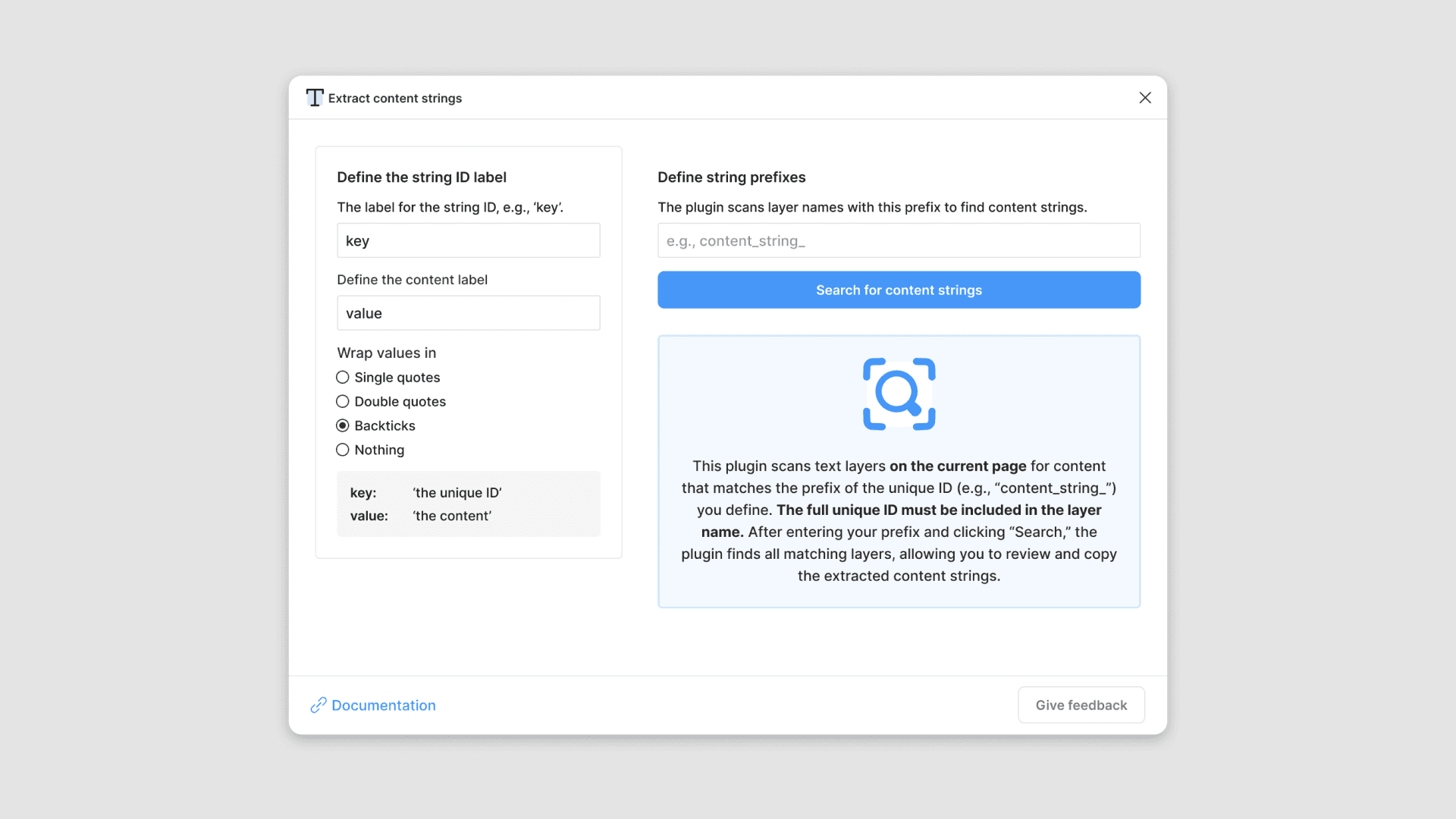
Extract Content Strings is a Figma plugin that helps designers and developers move interface content from designs into other tools. It scans text layers for unique content IDs, then pairs each ID with its corresponding text so you can copy and use the strings outside Figma. I designed and built the plugin around a simple convention: teams use each content string’s unique ID as its Figma layer name. Users enter the shared prefix for those IDs, and the plugin finds and extracts every matching string on the page, making handoff, content management, and localization easier.
Extract Content Strings is a Figma plugin that helps designers and developers move interface content from designs into other tools. It scans text layers for unique content IDs, then pairs each ID with its corresponding text so you can copy and use the strings outside Figma. I designed and built the plugin around a simple convention: teams use each content string’s unique ID as its Figma layer name. Users enter the shared prefix for those IDs, and the plugin finds and extracts every matching string on the page, making handoff, content management, and localization easier.